Scope your build before committing engineering resources. Bettermile's modular architecture lets you integrate standalone capabilities into existing workflows or deploy a full-stack solution. Match your business goals to the right technical path below to see requirements, prerequisites, and data flows.
Already selected your path and ready to build? Skip straight to Data Ingestion via Data Gateway.
| Your goal | Integration path |
|---|---|
| Plan and load tours efficiently, ahead of and independent of route execution or tracking | Better Planner |
| Improve recipient experience now, with minimal operational change | Better Tracking - Shadow |
| Enhance driver onboarding and productivity with clear guidance from depot to road, without customer-facing tracking | Better Route |
| Improve recipient experience and driver productivity together | Better Tracking - Orchestrate + Better Route |
| The full-stack solution - planning, routing, and real-time tracking together | Better Planner, Better Tracking - Orchestrate + Better Route |
| Enhance your own stack with specific Bettermile capabilities | Custom Modules |
Nearly all paths require a data stream setup - see What most paths require.
Best for: Carriers who want to plan and load tours efficiently - optimised for capacity and constraints - independent of route execution or recipient tracking.
How it works: Better Planner plans and loads your tours ahead of dispatch, flexibly optimised for your capacity and constraints.
What it requires: A connector that sends your delivery job data to Bettermile. See What most paths require.
Best for: Carriers who want to deploy recipient tracking quickly, without a driver app rollout or change management.
How it works: Better Tracking - Shadow generates dynamic delivery windows using scan events and machine learning - no driver app or vehicle integration is required. Recipients see a live tracking page based on predicted ETAs.
What it requires: Scan event data sent to Bettermile. No connector build required for this path.
Contact the Bettermile team at customer@bettermile.com to discuss onboarding for this path.
Best for: Carriers who want faster driver onboarding and clear guidance from depot to road, stop to stop, and into the last meter - without needing customer-facing tracking.
How it works: Better Route calculates optimised multi-stop sequences for drivers, updated dynamically as the day unfolds. You can reach drivers either through deep integration into your own systems, or turnkey via the Bettermile Driver App - no custom app required.
What it requires: A connector that sends your delivery job data (addresses, assignments, status updates) to Bettermile. See What most paths require.
Best for: Parcel carriers who want to optimise routes, improve driver productivity, and give recipients minute-level delivery accuracy - as a combined solution.
How it works: Better Route calculates optimised multi-stop sequences for drivers, updated dynamically during the route - either via deep integration or the Bettermile Driver App. Paired with Better Route, Better Tracking runs in Orchestrate mode, giving recipients a live view based on actual vehicle position. Both modules run on the same data stream - you build the connector once and both are active.
What it requires: A connector that sends your delivery job data (addresses, assignments, status updates) to Bettermile. See What most paths require.
This is the most common integration path for parcel service providers.
Best for: Carriers who want the full-stack solution - tour planning, route optimisation, driver guidance, and real-time recipient tracking - in one integrated setup.
How it works: Better Planner plans and loads your tours ahead of dispatch. Better Route then calculates optimised multi-stop sequences for drivers - via deep integration or the Bettermile Driver App - updated dynamically as the day unfolds. Better Tracking runs in Orchestrate mode alongside it, giving recipients a live view based on actual vehicle position. All three modules run on the same data stream, so combining them adds synergy on top of each module's individual benefits, without separate integrations to build or maintain.
What it requires: A connector that sends your delivery job and tour planning data to Bettermile. See What most paths require.
This is the most complete integration path, combining every module's benefits.
Best for: Engineering teams building or enhancing a proprietary driver app who want to integrate specific Bettermile capabilities as modules.
Available modules:
- Sequence Optimisation - dynamic multi-constraint route optimisation
- Navigation - turn-by-turn guidance with real-time traffic
- Better Places - address cleaning and precise geocoding
- Location Intelligence - entrances, parking spots, and handover points
What it requires: Varies by module. Better Places has no connector requirement. Sequence Optimisation and Navigation require a data stream. Contact the Bettermile team at customer@bettermile.com to scope your specific combination.
Most paths require a working data stream: your core system needs to send delivery job data (addresses, driver assignments, status events) to Bettermile before drivers begin their routes. You set this up once by building a connector - a small integration component that reads from your system and uploads data to Bettermile via AWS S3.
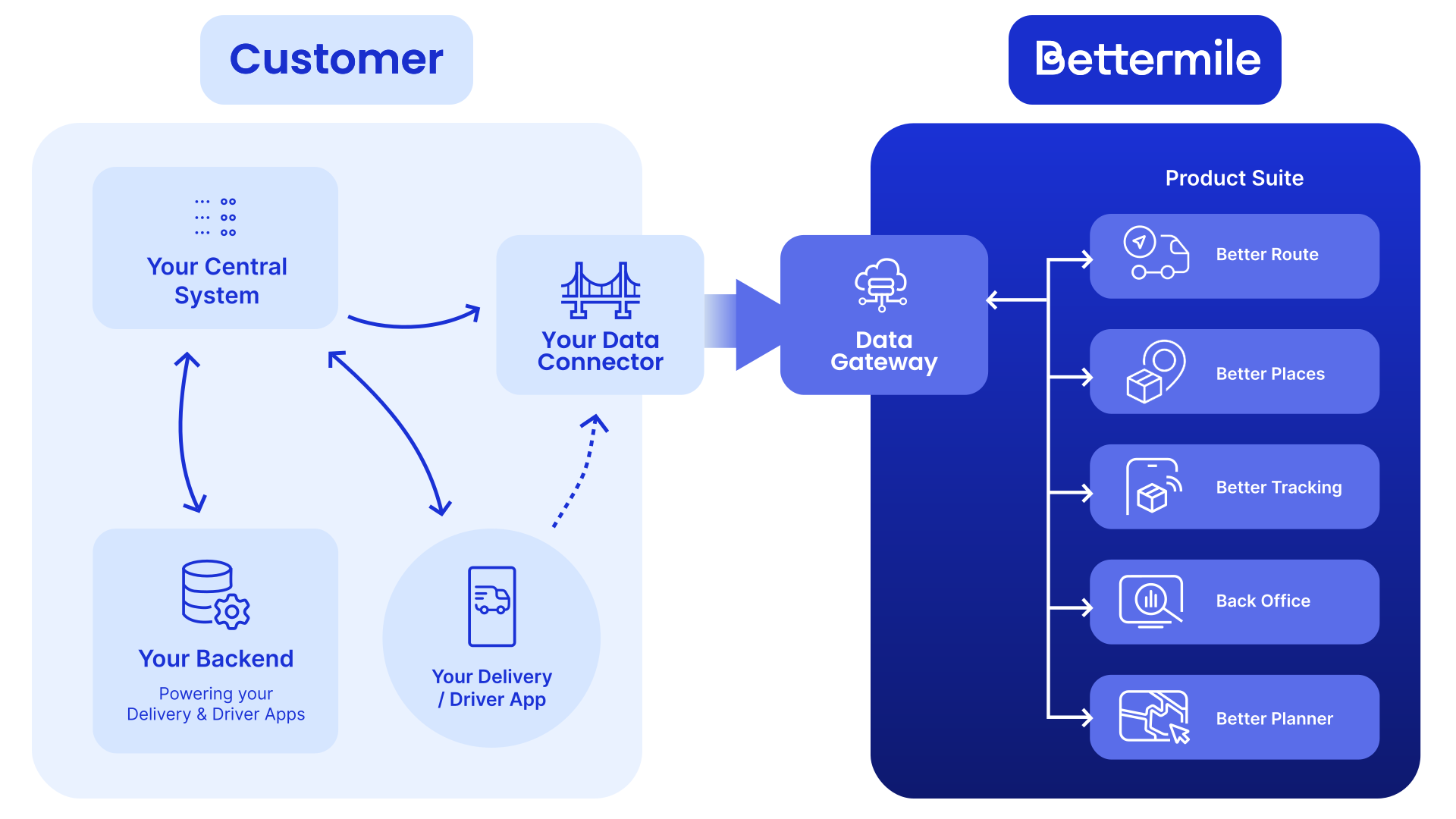
The data stream setup has four steps:
- Connector design - define how your route manifest and delivery event data will reach Bettermile
- Data transfer - upload files via AWS S3 (batch or event-driven)
- Data format reference - the required JSON schema, field definitions, and validation rules
- Validation & go-live - the Bettermile Tenant Connect Team provides validation tools and a debugging checklist (link to checklist coming)
New to this? Start with Quickstart: Minimal Pilot Setup to run a pilot on a single route before committing to the full implementation.
Previous: Overview Next: Data Ingestion via Data Gateway