Better Route is modular. You can onboard quickly using the Bettermile Driver App, or integrate only the components you need to power your own driver application.
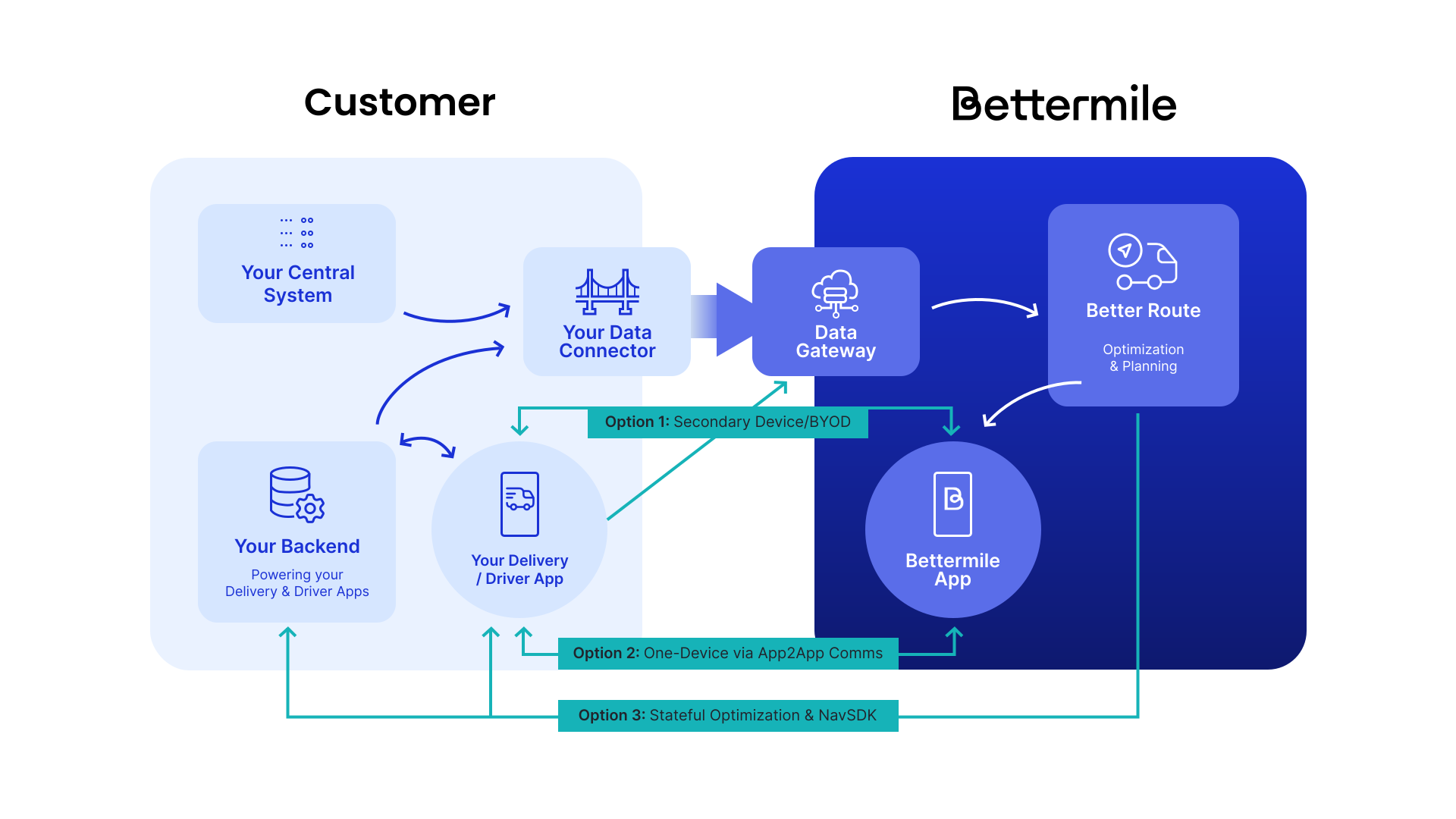
Every integration needs a working connector into the Data Gateway: it delivers your job data (master data, assignments, status changes) from your systems into Bettermile for optimisation. Even the lightest integration needs one before there are any jobs to sequence.
Before you start building:
- Read Connector Design to understand when your system should send master data, assignments, and status changes.
- Read Data & Delivery Format for the JSON schema your connector needs to produce.
- Decide between a simple setup (minimal data, sent shortly before the driver needs it, a good fit for a pilot) and a full dynamic setup (pre-advice, assignment, and status data sent in three phases, required for high parcel volumes and full feature support). Both are explained in Connector Design.
Before going live, your connector is validated through automatic JSON schema checks plus a manual review, done jointly by your team and Bettermile.
Two approaches, each with an optional extension. Pick by how much of the driver experience you want to build yourself.
| Bettermile Driver App | Deep Integration | |
|---|---|---|
| What it is | Our app handles the driver experience. | You build the driver experience on the Better Route API. |
| You build | The connector, plus device setup. | The connector, plus backend, sequence logic, and driver UI. |
| Bettermile handles | Tour setup, optimisation, navigation, job status. | Optimisation. |
| Extend it with | Your own scanner or loading app on the same device (App-to-App Library, plus webhooks). | Bettermile navigation and address formatting (Navigation SDK, plus Address Formatter Kotlin). |
| Effort | Hours, excluding the connector. | Weeks. |
Authentication depends on the path: the Driver App uses provisioned driver accounts; Deep Integration uses a Better Route API key (x-api-key). Each path's own page covers the details.
Each path adds requirements on top of the connector above.
- Connector (see above).
- A device to run the app: Bettermile-managed hardware, your own managed Android device, or an unmanaged device in Personal-Device mode. See Choosing a deployment mode for the Company Device vs. Personal-Device distinction.
- A driver account, so the app can log in and pull the assigned tour.
Tenant provisioning is not self-serve: Bettermile sets up your tenant, and grants your depot personnel access to their respective depot via Backoffice. From there, driver account creation is self-serve: depot personnel create the individual driver accounts used to log in to the Bettermile Driver App.
Extending to a shared device with your own scanner or loading app additionally needs the App-to-App Library (ScanLib) integrated into your app, and a webhook endpoint on your side to stay in sync with the driver's current stop order. See Webhooks and Enhancing the single-device setup.
See the Driver App page for full setup details.
- Connector (see above).
- Access credentials for the Better Route API, currently an
x-api-keysent as a request header (see the Better Route API reference). This is a separate credential from your Data Gateway connector credentials, issued independently. - Backend capacity to create tours, request sequences, and keep your driver-facing application in sync with the returned data.
Extending with in-house navigation and multi-country address handling additionally needs the Navigation SDK and Address Formatter Kotlin embedded in your custom Android driver app.
See the Deep Integration page for the basic data flow and how to create your first tour and sequence.
- Confirm your integration path using Choosing your integration path above.
- Build and validate your Data Gateway connector. See Connector Design.
- Complete the path-specific setup from the section above.
- Bettermile Driver App: install the app on your chosen device and confirm a driver can log in and receive a sequence.
- Deep Integration: create a test tour via the Better Route API and confirm a sequence is returned.
- Talk to your Bettermile key account team about go-live timing and, for Deep Integration, moving from the dev environment to production.